This article explains whether it is possible to block internet access on a child’s device using Kidslox. It describes how internet blocking works and notes differences between iOS and Android devices.
On iOS devices, yes, you can completely block the Internet connection on your child's device when it is in Child mode.
On Android devices, you can block internet access, but some apps will still work when the device is in Child mode.
In order to block Internet access on your child's device: open Kidslox > choose the device on which you want the Internet blocked > open the Apps tab > Web Filtering > Internet access > mark it with the lock sign.
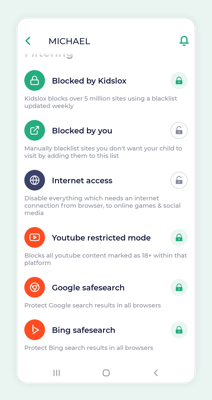
Now whenever the device is in Child mode, it will have no access to the Internet (on Android Kidslox will still continue to work).

Comments
2 comments
So, is it possible to block internet access only in the lockdown mode?
Internet Access feature blocks the internet connection in Child mode only.
Please sign in to leave a comment.